Suggested Technique for Creating a Helical Feature as a Sweep

Procedure
  1. Create Default Datum Planes and create a 360 revolved surface. Figure 1 shows the dimensioning scheme to create a cylindrical surface. The total length of the the sketched line represents the free length of the spring; the diameter will be the mean spring diameter.

    Figure 1


  2. Create a sketched Datum Curve on DTM3. Sketch a straight line which is aligned to the axis of the cylinder created in Step 1 and whose end points are aligned to the top and bottom of the cylinder, Figure 2. This curve will be the spine for the variable section sweep.

    Figure 2


  3. Create another straight Datum Curve sketched on DTM3. It is a line offset from the axis by an arbitrary value (in this example the value is 5.00). Align the endpoints of the sketch to the ends of the cylinder, Figure 3. this curve will be the X-vector trajectory of the variable section sweep.

    Figure 3


  4. Create a Surface using New, Advanced, Var Sect Swp, Normal Spine, Select Traj. Use Select and One By One to pick the first datum curve as the spine. Pick Done, Select Traj and One By One to select the second datum curve as the horizontal vector. (Refer to "Variable Section Sweeps" in the Part Modeling User's Guide for further information on sweep terminology or procedures.)
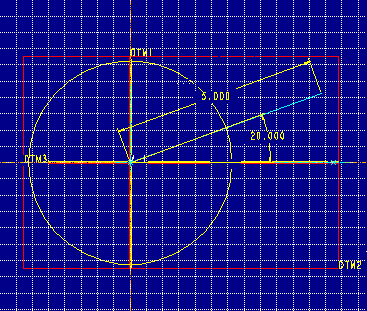
  5. Create the section shown in Figure 4a. It is a line aligned to horizontal and vertical datums and at an angle to the horizontal datum. The length of this line must be greater than the radius of the cylinder.

    Figure 4a


    Add the sketcher Relation:

    sd# = trajpar * 360 * 3

    where sd# is the dimension symbol of the angular dimension and the number "3" signifies the number of turns. This will create a helical surface, Figure 4b.

    Figure 4b

    ====================================================================
    About the Relation:
    The trajectory parameter, "trajpar," changes from 0 to 1 as the 
    section is swept along the spine curve. Multiplying this parameter
    by 360 yields one full angular revolution (from 0 to 360 degrees).
    Multiplying the product by another value (in this example 3) defines
    how many revolutions the section must make as it sweeps, analogous
    to the number of coils in the spring.
    ======================================================================
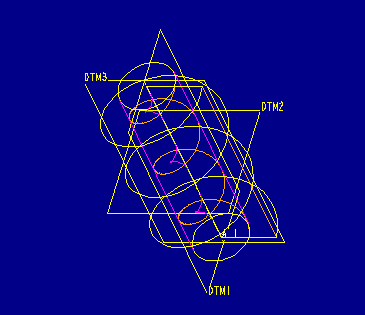
    

  6. Now make a Datum Curve at the the intersection of the two surfaces. Use the Intr Surfs option. Pick Whole and select the helical surface created in Step 5, then pick Whole and select the cylindrical surface created in Step 1. The intersection of the two surfaces will be a helical curve along the cylinder, Figure 5.

    Figure 5


  7. Create a Protrusion using the Sweep form. Choose Sel Traj, Select, Curve Chain and pick on the helical curve. Choose Select All as the Chain option, then Done. Accept the cylindrical surface as the normal surface for the cross-section. Okay the upward direction for the section.
  8. Sketch the section show in Figure 6. It is a 2.00 diameter circle centered on the sweep crosshairs. This diameter corresponds to the wire diameter of the spring. See Figure 7 for the completed model.

    Figure 6


    Figure 7


Back to Pro/ENGINEER technical information